Set a home place and choose your units
On this page
A home place is the one place Weather opens on when you visit. Units are how numbers are written: degrees Fahrenheit or Celsius, miles or kilometers, percent or American odds. Both are yours to set, and both are kept in your browser.
#Set a home place
-
Open the Weather page and search for your ZIP code or city, or select Use my location and let your browser tell 4Search where you are.
-
On the place's page, select Set as home. A short message confirms it, for example "Boston, MA is your home place".

Set as home sits beside Follow and the degrees F and C switch at the top of a place's page.
- 1Follow this place
- 2Set as home
- 3Degrees F or C
-
Open the Weather overview. It now starts with a card marked Your home and that place's current conditions.
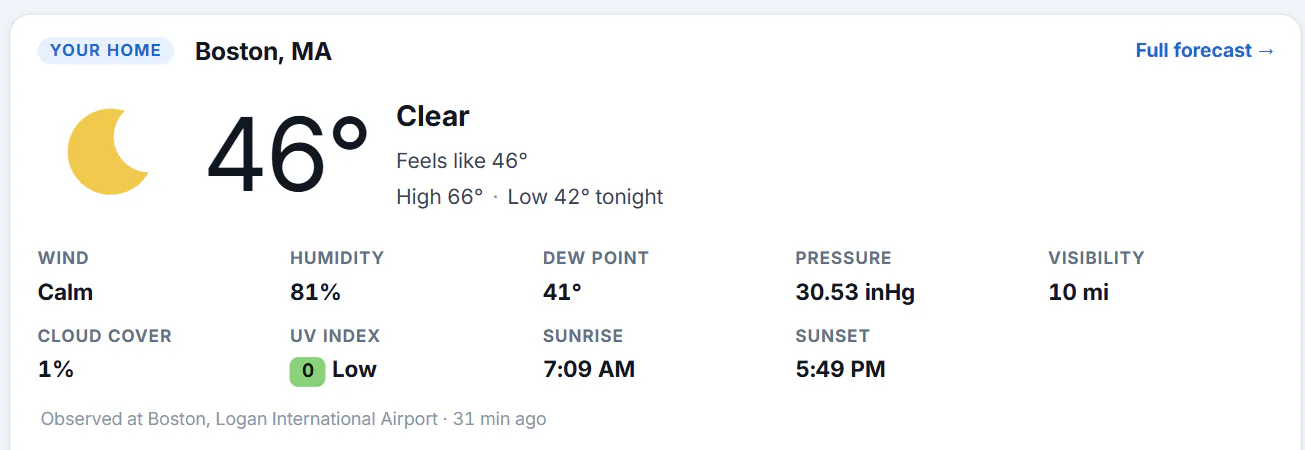
With a home place set, the Weather overview opens on it.
- 1The overview opens with your home place
A search for the single word weather shows your home place too.
If Saved preferences is off, selecting Set as home first opens a box titled Enable cookies to set your home. Your home place is kept in a cookie in this browser, and the box explains that. Select Enable cookies to turn on Saved preferences and set the place, or Not now to leave it.
#Change or clear it
Go to another place and select Set as home there. To clear it, go back to your home place's page and select Your home; the message "Home place cleared" appears. Turning Saved preferences off also removes it.
#About "Use my location"
Use my location asks your browser for your position. The browser asks your permission first. The position, rounded to about 100 meters, is sent once to find the nearest place and, according to the Privacy Policy, is not kept. It does not set your home place by itself: you choose that on the place's page.
Without a home place, the Weather overview may show the weather near the approximate location your network connection suggests. The policy says that location is not kept either.
#Choose your units
| What | Where to change it | How long it lasts |
|---|---|---|
| Weather: degrees F or C, with matching wind, rain, pressure and distance units | The °F and °C switch at the top of a place's page | With Saved preferences, a year. Without it, until you close the browser. |
| Maps: miles or kilometers | Distances in, at the bottom of the Layers menu on the map | With Saved preferences, until you remove it. Without it, until you close the tab. |
| Predictions: how odds are written | Show odds as with %, US (American odds) and Dec (decimal odds) | With Saved preferences, until you remove it. Without it, only on the page you are on. |
Until you choose, Weather picks from your browser's region: Fahrenheit in the United States, for example, and Celsius in most other places.
#What is kept, and where
Your home place and your Weather units are cookies named wx_home and wx_units. The Cookie Policy lists both. They are sent along with your requests so Weather pages can show your place and units. The map and odds settings stay in your browser.
#Common questions
Can I set a home place outside the United States?
Yes, for any place that has a Weather page. Search for a city with its country, such as Paris, France, then select Set as home.
Does my home place follow me to my phone?
No. It is kept in the browser where you set it. Set it again on your phone.
Why does Weather still open on the general overview?
No home place is set in this browser. Either you have not set one, you cleared site data, or Saved preferences was turned off, which removes it. See Location not found, or the wrong place.
Does choosing °C change Maps too?
No. Each service has its own units choice: Weather uses °F or °C, Maps uses miles or kilometers, and Predictions has its own odds format.